Quick checklist
Before anything else, open the B9 app and check three things: has at least one paycheck or benefit payment landed in your B9 account, have at least $100 of those deposits arrived in the last 14 days, and is any earlier advance still unpaid? Those three answers explain most cases.
1. Your first paycheck hasn't arrived yet
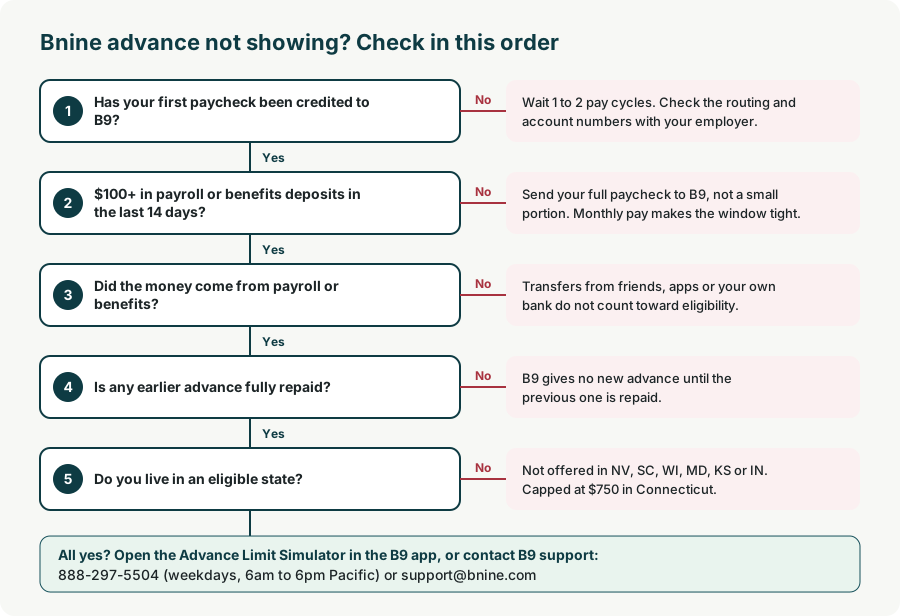
B9's own steps are: open the account, set up direct deposit, then wait until your first paycheck is credited to your B9 account. Nothing is available before that first deposit, even if you already pay for a plan. Payroll changes often take one or two pay cycles to switch over.
Fix: confirm the switch date with your employer or benefits provider and check that the routing and account numbers match the ones shown in the app.
2. Less than $100 in the last 14 days
B9 requires at least $100 in payroll or benefits deposits to your B9 account within the last 14 days. The window rolls forward every day, so an advance can disappear when an older deposit drops out of the window.
Fix: route your full paycheck, not a small portion, to B9. If you are paid monthly, expect the window to be tight.
3. The money you added doesn't count
B9 states that funds you move into your account outside your paycheck do not count toward your payroll deposit. Transfers from friends, other apps or your own bank account won't unlock an advance.
Fix: only payroll or government benefit deposits count. Set up a direct deposit from the employer or agency itself.
4. An earlier advance is still unpaid
B9 will not provide further advances while any part of a prior advance remains unpaid. Repayment normally happens automatically from your next deposit.
Fix: check the advance balance in the app. Once it is repaid, a new advance can become available.
5. You live in an excluded state
The advance is not offered in Nevada, South Carolina, Wisconsin, Maryland, Kansas or Indiana, and it is capped at $750 in Connecticut. See Bnine state availability.
6. Your limit changed
B9 bases your limit on account history, how often you are paid, how much you deposit and other factors, and says limits may change at any time at its discretion. A smaller or irregular paycheck can lower the amount shown.
Fix: use the Advance Limit Simulator in the app to see what affects your next advance.
7. Your membership isn't active
Advances need an active Basic ($9.99 a month) or Premium plan. If a membership payment failed or you canceled, the advance won't appear. B9 waives the fee if you deposit $5,000 or more a month.
8. Your identity check is incomplete
New accounts need identity verification with an SSN or ITIN. If the app still asks for documents or details, finish that step first.
Still not showing?
Contact B9 at 888-297-5504 (weekdays, 6am to 6pm Pacific) or [email protected]. Include your deposit dates and amounts. More contact options are on our Bnine customer service page. If you need money before your advance returns, compare Bnine alternatives.
Frequently asked questions
Why does my Bnine advance say $0?
Usually because your first paycheck hasn't arrived in B9, you have less than $100 in payroll or benefits deposits in the last 14 days, or an earlier advance is unpaid.
Do transfers from Cash App or my bank count for Bnine?
No. B9 says funds added outside your paycheck do not count toward your payroll deposit.
How long after direct deposit can I get a Bnine advance?
Once your first qualifying paycheck is credited to your B9 account and you meet the $100 in 14 days rule, the advance can appear in the app.